Comprehensive Security Reporting, All in One Place

Store, organize, and visualize structured security reports — including SonarQube, OWASP Top 10, CWE Top 25 and more — so your teams can track trends, drill into findings, and demonstrate readiness with confidence.

Why Choose Security Reporting

Security teams often struggle to keep track of multiple scanners, formats, versions, and findings across teams and products. Procurize AI Security Reporting centralizes all structured reports into a searchable repository and presents them in rich visual and tabular formats, so you can confidently track security posture over time.

Benefits

  • Central repository for all structured security reports
  • Visual dashboards for trends and compliance status
  • Report upload via UI or API/webhooks
  • Historical report versioning and export
  • Supports popular formats: SonarQube, OWASP Top 10, CWE Top 25

How It Works

1

Upload or Ingest Reports

Bring in structured reports manually via the UI or programmatically using REST API/webhooks. (Procurize AI supports common formats and automated ingestion.)

2

Organize by Product

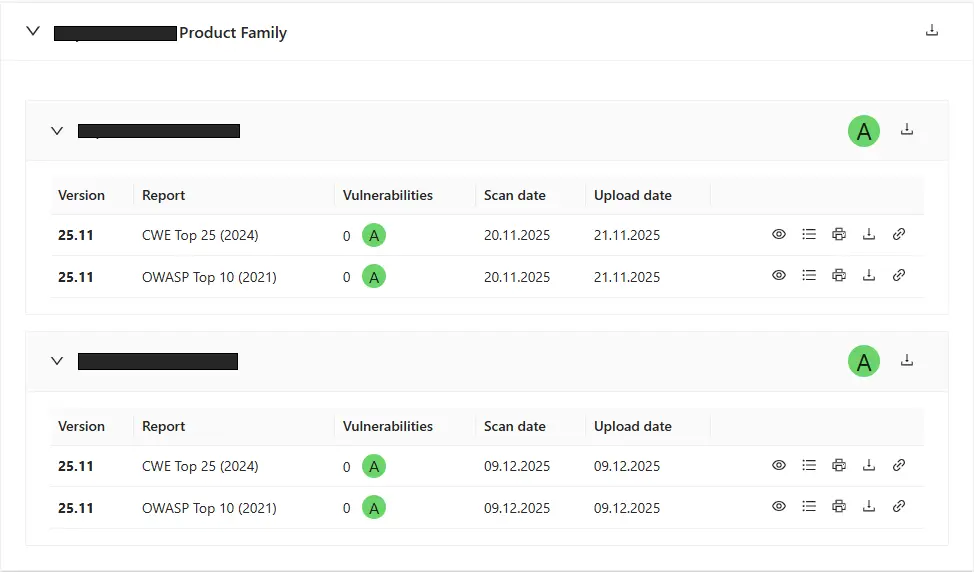
Reports are grouped by product and displayed as cards showing the most recent scans, vulnerability counts, and status summaries.

3

Visualize Trends

Use built-in charts to track the number of vulnerabilities by severity and report type over time.

4

Export with Ease

Download individual reports in HTML, PDF, or full ZIP archives for sharing with auditors and stakeholders. You can also export all product reports for a group.

Core Capabilities

Product-Level Report Cards

Product-Level Report Cards

Each product has a card summarizing the latest security reports (scan dates, vulnerability count, overall category).

Trend Dashboards

Trend Dashboards

View aggregated data across versions and report types via bar charts and visual summaries.

APIs & Webhooks

APIs & Webhooks

Automate report ingest with flexible REST APIs and webhook integration.

Historical Archive

Historical Archive

Access all previous reports and versions for comparison or audit purposes.

Who Benefits

  • Security & Engineering Teams

    Track vulnerabilities and fix trends across products with centralized insights.

  • Product Owners

    See at-a-glance quality metrics and improvements between versions.

  • Compliance & Audit Teams

    Export structured evidence tied to scan dates and severity data.

  • DevOps & SRE

    Monitor quality gates and trends as part of CI/CD reporting.

Get Started

Security reporting doesn’t have to be siloed or manual.

Start centralizing your reports and track your security posture with confidence.

Try It Free
to top
Select language