
SonarQube Security Reports Repository
Overview
The SonarQube Security Reports Repository is a core component of the Procurize AI platform that stores, indexes, and exposes SonarQube security reports for long-term access and analysis. The repository is optimized for automated ingestion, structured organization by product and version, and downstream consumption through the UI and export mechanisms.
The repository supports security reports generated by SonarQube and is commonly used as part of CI/CD, application security, and compliance workflows.
Supported Report Types
The repository accepts and stores the following SonarQube security report types:
Each report is associated with a specific product and product version and is stored with metadata required for filtering, aggregation, and historical analysis.
Data Model and Organization
Products and Groups
Reports are organized using a hierarchical model:
Product
Represents an individual application or service.
Product Group
Represents a logical grouping of related products.
Products and their group hierarchy are defined in the platform configuration. For configuration details, see How to configure security reports.
Report Metadata
Each stored report includes the following metadata:
- Product name
- Product version
- Report type
- Scan execution date
- Report upload date
- Total vulnerability count
- Overall vulnerability category
This metadata is used for dashboard rendering, filtering, exports, and API-driven integrations.
Dashboard Representation
Security Reports View
Stored reports are exposed in the Procurize AI dashboard under:
Compliance → Security report
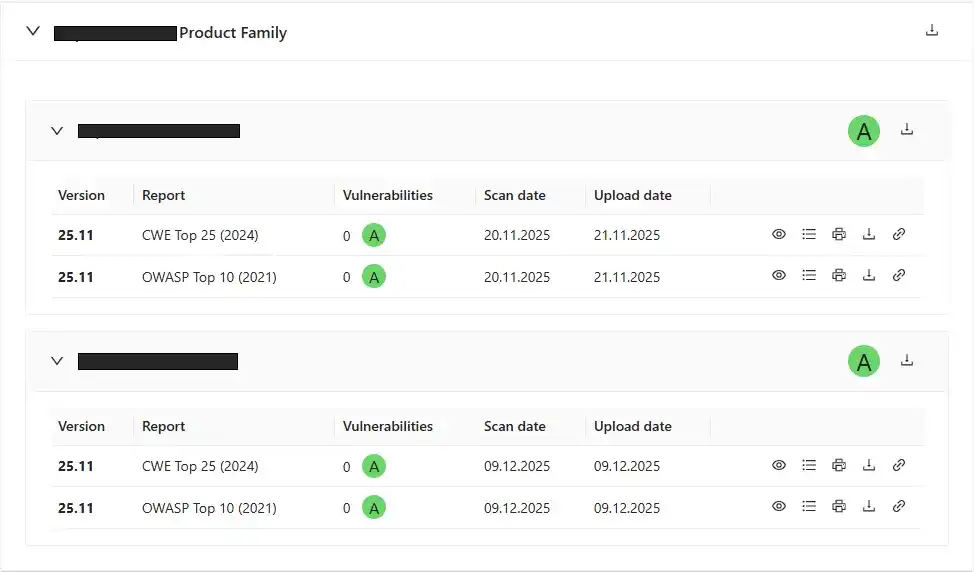
Products are displayed as individual cards
Each product card contains a table showing the latest reports per report type
The table summarizes:
- Scan date
- Upload date
- Vulnerability count
- Overall vulnerability category
This view reflects the most recent report ingestion state for each product.
Summary Visualization
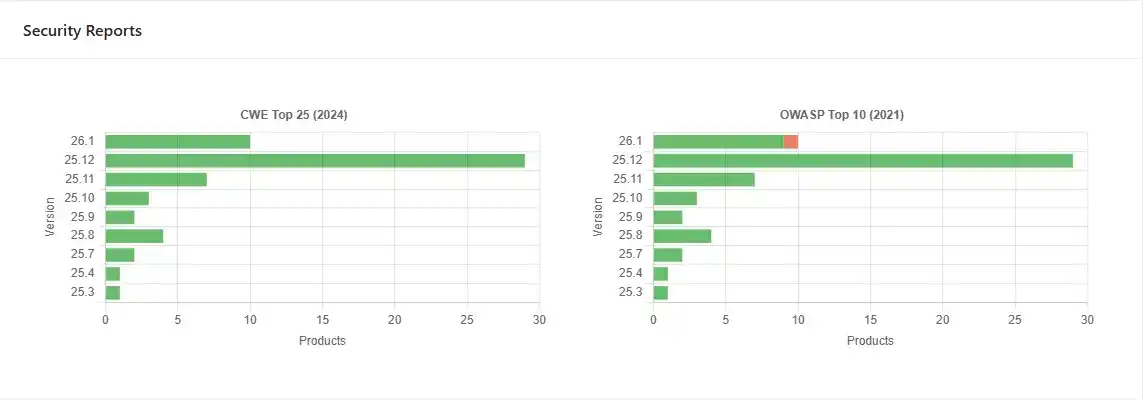
The Home dashboard page displays aggregated repository data:
- Bar charts show the number of reports per product version
- Charts are grouped by report type
- Provides a high-level overview of scan coverage and reporting activity
Report Access and Export
Viewing
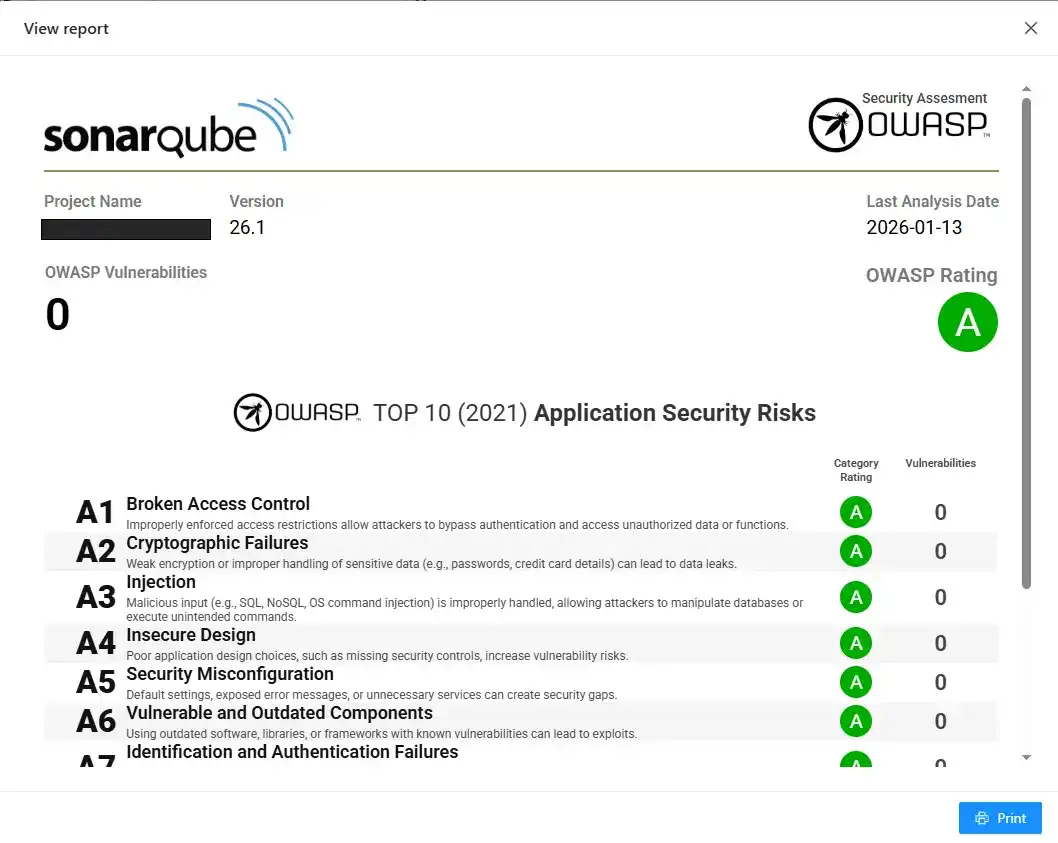
Reports stored in the repository can be rendered directly in the browser for review.
Export Formats
The following export formats are supported:
- HTML
- ZIP archive containing all supported formats

Bulk Exports
The repository supports bulk export operations:
- ZIP archive containing all reports for a single product
- ZIP archive containing reports for a product group and its child products
Bulk exports are typically used for audit evidence, customer reviews, and compliance submissions.

Historical Reports
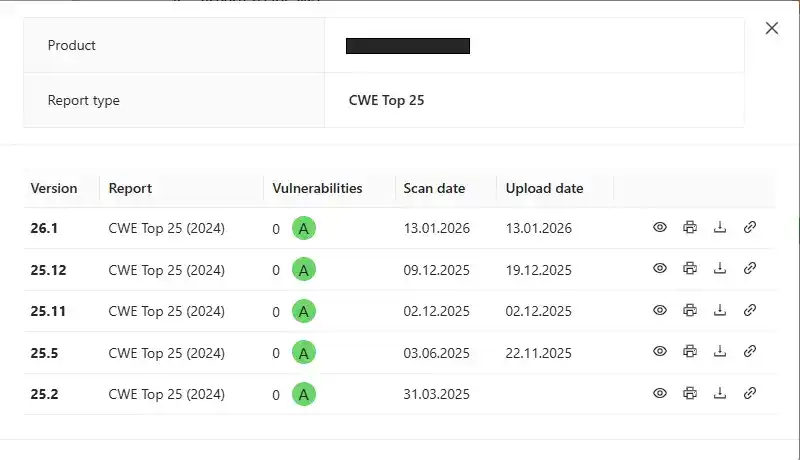
For each report type, the repository maintains a complete historical record.
- All previous reports remain accessible
- Historical reports are grouped by product and version
- Enables longitudinal analysis of security findings
Historical data is exposed through the UI via the List of previous reports view.
Report Ingestion
REST API Integration
Reports are ingested into the repository through a REST-based interface designed for automation.
- Supports CI/CD-driven uploads
- Enables consistent, repeatable report ingestion
- Eliminates manual file management
The API specification is documented in SonarQube Reports API.
Intended Use Cases
- Centralized storage of SonarQube security reports
- Version-aware security trend analysis
- Compliance and audit evidence management
- Automated ingestion from CI/CD pipelines
- Portfolio-level security visibility