
How to Configure Security Reports
The Security Reports configuration in Procurize AI defines how SonarQube projects are organized, displayed, and ingested into the platform. Proper configuration ensures that security reports are accurately associated with the correct products and accessible via the Security Reports Dashboard.
Note: Configuring security reports requires administrator privileges. See the Roles and Permissions for details.
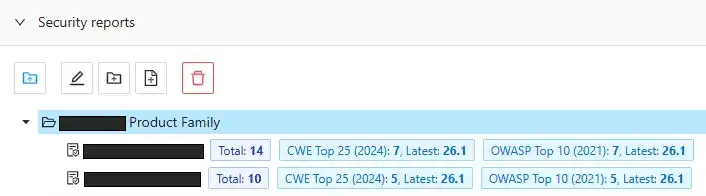
Project Groups
Projects are organized into groups for logical separation and portfolio-level management.
Each group can contain:
- Child groups
- Individual projects
At least one project group must exist to configure projects.
Project grouping enables hierarchical organization, bulk downloads, and aggregated reporting.
Project Configuration Fields
When creating a project within a group, the following fields are required:
| Field | Description |
|---|---|
| SonarQube URL | The base URL of the SonarQube instance. |
| Project Key | The unique identifier of the SonarQube project. Used together with the URL to search for reports in the repository. |
| Product Name | The display name for the product. Appears on the Security Reports dashboard and in downloaded reports. |
| Report File Name | Typically based on the product name. Required for integrations with systems that depend on consistent file naming. |
The combination of SonarQube URL + Project Key ensures accurate report association and retrieval.
Key Points
- Projects must belong to a group.
- Product names define dashboard display and report labeling.
- Explicit report file names improve compatibility with external systems.
- This configuration underpins API ingestion, dashboard display, and export functionality.
Related Documentation
- SonarQube Security Reports Repository — Reference for how reports are stored and accessed.
- SonarQube Reports API — Reference for automated report uploads.
- Webhooks for Security Reports — Event-driven notifications for report updates.